Video Automation: Create Stunning Videos at Scale with AI

Transform your video production workflow. Use AI and templates to create thousands of personalized, professional videos automatically—saving time, cutting costs, and scaling your content effortlessly.

10,000+
Videos per batch possible
90%
Time saved vs manual editing
25-70%
Conversion lift reported
$0.01
Cost per video at scale

Core Features of Video Automation

Understand the key capabilities that make automated video creation possible at enterprise scale.

Template-based video creation
📋

Template-Based Creation

Start with pre-built or custom templates. Define your scenes, layouts, and branding once, then automate variations for different products, audiences, or languages.

🤖

AI-Powered Editing

Automatic transitions, animations, and timing adjustments. AI handles the tedious work of frame-by-frame editing, letting you focus on creative direction.

Data-driven video personalization
📊

Data-Driven Personalization

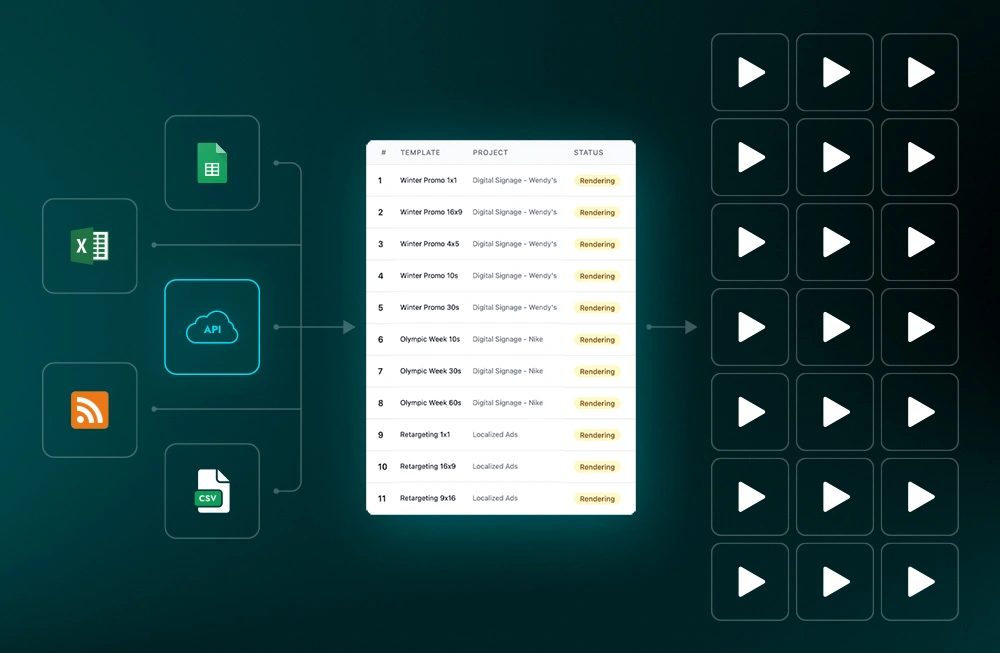
Connect spreadsheets, APIs, or databases to generate unique videos for each customer, product, or data point. True 1:1 personalization at scale.

☁️

Bulk Production & Cloud Rendering

Create 10, 100, or 10,000+ videos from a single template. Cloud infrastructure handles rendering, eliminating the need for expensive local hardware.

Limitations & Known Constraints

An honest look at what video automation can and cannot do—so you can set realistic expectations.

Rendering Time Limits

Most platforms charge by rendering minutes, not video count. High-volume production can hit plan limits quickly—budget accordingly.

Template Dependency

Output quality depends entirely on your template design. Poorly designed templates produce poor videos, even with great automation.

Creative Limitations

Complex storytelling, emotional narratives, and unique creative direction still require human touch. Automation excels at repetitive, structured content.

Initial Setup Investment

Data integration, template creation, and workflow setup require upfront time investment. ROI typically appears after 50+ videos produced.

Software Requirements

Some tools (like Plainly) require Adobe After Effects for templates. Others are fully browser-based. Check compatibility before committing.

When to Use Video Automation

A clear decision framework to help you determine if automated video production is right for your needs.

Use Video Automation When:

  • You need 50+ similar videos with personalized content
  • Your content follows repeatable patterns (product demos, reports, ads)
  • You have structured data ready to connect (CSV, API, database)
  • Speed and consistency matter more than unique creative per video
  • You're scaling content across multiple platforms or languages
  • Your team creates recurring content (weekly reports, daily updates)

Consider Manual Editing When:

  • Creating one-off brand films, documentaries, or hero content
  • Video requires complex narrative storytelling
  • No established template or pattern exists yet
  • Budget allows for bespoke creative work per video
  • Content requires real-time creative adjustments
  • You're producing fewer than 10 videos total

Use Cases & Results

Real-world applications of video automation across industries, with documented performance improvements.

E-commerce product videos
🛒

E-commerce Product Videos

Automated product showcases for every SKU. 25% conversion lift reported by online retailers.

YouTube automation
📺

YouTube Channel Automation

Faceless content channels with AI-generated scripts, voiceovers, and visuals. Scale content without on-camera presence.

Marketing campaign videos
📈

Marketing Campaigns

Personalized video ads for every audience segment. 30% higher engagement than generic content.

Internal communications
🏢

Internal Communications

Automated company updates for global teams. 50% employee engagement increase at multinationals.

Real estate virtual tours
🏠

Real Estate Listings

Virtual property tour videos from listing data. 70% more inquiries for automated listings.

Data visualization videos
📊

Data Visualization

Financial reports, sports stats, and news summaries turned into video automatically. Used by Bloomberg, NYT, and Johns Hopkins.

Top Video Automation Tools Compared

Find the right tool for your use case with this feature comparison.

Feature Plainly InVideo AI Lumen5 JSON2Video
Best For After Effects users YouTube creators Marketing teams Developers
AI Script Generation
API Access
Template Source After Effects Built-in library Built-in library JSON schema
Free Tier 14-day trial Limited (watermark) Limited Pay per use
Bulk Production ✓ Unlimited ✓ Unlimited
Data Integration ✓ CSV, API, Zapier ✗ Manual only ✗ Manual only ✓ JSON, API
No-Code Option Partial (Make.com)

How Video Automation Works

A simple 5-step process from template to thousands of rendered videos.

1

Choose Template

Select a pre-built template or design your own in After Effects or the platform's editor.

2

Mark Dynamic Elements

Tag text, images, and video clips that will change for each version.

3

Connect Data

Link your spreadsheet, API, or database containing personalization data.

4

Render at Scale

Cloud infrastructure processes all variations simultaneously.

5

Distribute

Auto-publish to platforms or download for manual distribution.

Frequently Asked Questions

What is video automation?

Video automation is the use of software and AI to automatically create, edit, and render videos based on templates and data inputs. Instead of manually editing each video, you define a template once and let the system generate variations for different products, customers, or content pieces at scale.

What are the benefits of video automation?

Key benefits include: 90% time savings compared to manual editing, ability to produce thousands of personalized videos, consistent brand quality across all content, significant cost reduction at scale, and the ability to connect video production directly to your data sources for true 1:1 personalization.

Who should use video automation?

Video automation is ideal for e-commerce businesses, marketing agencies, media companies, enterprise communications teams, real estate agencies, and anyone producing video content at scale. If you're creating more than 50 similar videos or need data-driven personalization, automation will likely save you time and money.

What types of videos can be automated?

Commonly automated video types include: product videos, personalized sales messages, real estate listings, social media content variations, localized/translated versions, recruitment videos, data visualization reports, sports highlights, and dynamic video ads. Any video with repeatable structure is a good candidate.

How does AI help with video automation?

AI enhances video automation by: generating scripts from prompts, creating voiceovers with natural-sounding voices, automatically selecting relevant stock footage, optimizing timing and transitions, and personalizing content based on viewer data. AI makes the automation smarter and reduces the need for manual intervention.

Is YouTube automation legal?

YouTube automation for content creation is legal, provided you follow YouTube's Terms of Service. This means: using original or properly licensed content, not artificially inflating views/likes/comments, disclosing AI-generated content when required, and avoiding misleading or spam content. The key is creating legitimate value for viewers.

What are the limitations of video automation?

Key limitations include: rendering time/minute constraints on most platforms, dependency on template quality, inability to handle complex narrative storytelling, initial setup time for templates and data integration, and potential software requirements (some tools need After Effects). Automation excels at structured, repetitive content—not creative one-offs.

How much does video automation cost?

Costs vary widely: free trials are common (14 days typical), entry plans start around $29-99/month with limited rendering minutes, enterprise plans range from $500-2000+/month for unlimited production. API-based tools like JSON2Video charge per render (often $0.01-0.10 per video). At scale, cost-per-video drops significantly.

What's the difference between video automation and AI video generation?

Video automation uses templates and data to create variations of defined video structures. AI video generation (like Runway, Pika) creates entirely new video content from text prompts or images. Automation is best for consistent, branded, data-driven content at scale. AI generation is better for creative exploration and unique visual content.

Can I use video automation without coding?

Yes, most video automation platforms offer no-code interfaces. Tools like InVideo AI and Lumen5 are entirely browser-based with drag-and-drop editors. Plainly offers a visual dashboard alongside After Effects integration. JSON2Video also supports no-code workflows through Make.com and Zapier integrations.

Ready to Scale Your Video Production?

Start creating hundreds of personalized videos today. Most tools offer free trials—no credit card required.

Compare Tools & Get Started